
Running Ubuntu Containers with Hyper-V Isolation on Windows

Dustin Kirkland
on 13 September 2017
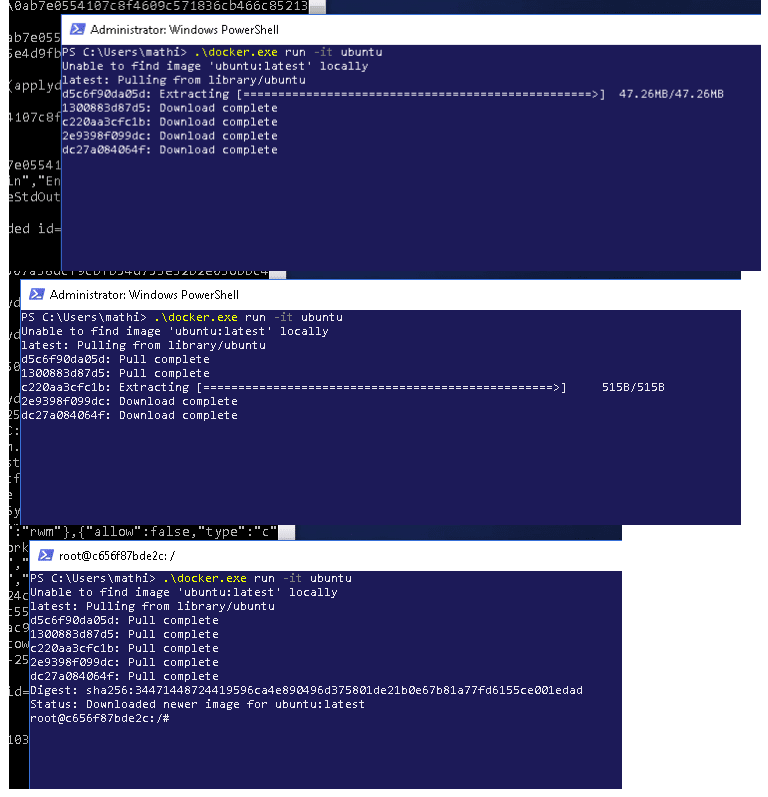
Canonical and Microsoft have teamed up to deliver an truly special experience — running Ubuntu containers with Hyper-V Isolation on Windows 10 and Windows Servers!
We have published a fantastic tutorial at https://ubu.one/UhyperV, with screenshots and easy-to-follow instructions. You should be up and running in minutes!
Follow that tutorial, and you’ll be able to launch Ubuntu containers with Hyper-V isolation by running the following directly from a Windows Powershell:
-
docker run -it ubuntu bash
Cheers!
Dustin
Talk to us today
Interested in running Ubuntu in your organisation?
Newsletter signup
Related posts
Canonical announces optimized Ubuntu images for TPU virtual machines by Google Cloud
Canonical and Google Cloud announced the availability of certified Ubuntu images for Google’s Cloud TPU Virtual Machines.
VMware hypervisor deployment using MAAS
Most modern datacenters are inherently heterogeneous. VMware environments coexist with container platforms, databases, and other bare-metal workloads, often...
Migrating from Apache Spark 3 to Spark 4
The purpose of this guide is to highlight the key differences between Apache Spark 3 and Spark 4, and provide advice on how to plan a migration. Let’s get...